
Blogger has released another new great feature. This time, the feature allows us to add custom favicon in our blogs. However, we've already got the custom codes in which we can add favicons to Blogger blog adding some lines of code in the template. We're quite little bit fast than Blogger.

Its simple easy to use Blogger's Favicon feature. Just follow the following steps:
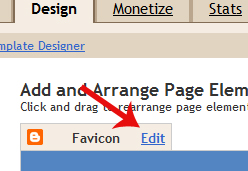
Login to Blogger > Design > Page Element. In the middle of the screen you'll see new 'Favcion' text. Just click 'Edit' button next to it.
Now you have to upload your favcion. If you don't have favcion already then you have to create it first. Just use Photoshop or search any suitable icons on the web. I recommend 16x16px size favicon.
Once you got it, use click Upload button and choose your favcion file. Once you you, click Save button.
Finally, refresh your blog and you'll see new little favicon in your address bar or tab of the browser.
Please note that you'll not have to change the format of favcion. Blogging will automatically do that for you. This is even great feature. From now, if you wanted to change favcion you'll not have to touch any codes.
Enjoy using Blogger!
Its simple easy to use Blogger's Favicon feature. Just follow the following steps:
Step 1
Login to Blogger > Design > Page Element. In the middle of the screen you'll see new 'Favcion' text. Just click 'Edit' button next to it.
Step 2
Now you have to upload your favcion. If you don't have favcion already then you have to create it first. Just use Photoshop or search any suitable icons on the web. I recommend 16x16px size favicon.
Step 3
Once you got it, use click Upload button and choose your favcion file. Once you you, click Save button.
Step 4
Finally, refresh your blog and you'll see new little favicon in your address bar or tab of the browser.
Please note that you'll not have to change the format of favcion. Blogging will automatically do that for you. This is even great feature. From now, if you wanted to change favcion you'll not have to touch any codes.
Enjoy using Blogger!
