Featured Post widget is important to add the most interesting content of your blog. By adding featured post widget, you can emphasize the most popular content and show it to your readers. You may have seen these kinds of widget in similar WordPress blogs.
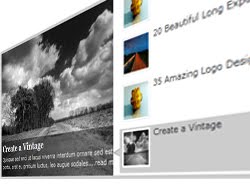
Today, we'll learn how to add it into Blogpsot Blogs. Earlier, I created Platinum Blogger Template. From the most of the template users, I received the comments that Featured Post widget is not present there. So considering this, I am writing the separate tutorial which we will start now!
First of all view the Demo here.
Note: Platinum Blogger Template users don't have to follow the Step1, Step2, Step3, Step4 and Step5. So you can directly jump to Step 6.
Updated: All code has been updated. Please re follow the instructions those who have installed this widget.
Step 1. As general, Log on to your Blogger account and go to Design > Edit HTML.
Step 2. Find the following code in your Template:
]]></b:skin>
Step 3. Just above ]]></b:skin> tag, add the following CSS codes:
Step 5. Save the Template.
Step 6. Again, Head out to Design > Page Element > Add a Gadget > HTML JavaScript. Add the following code into the box:
<div id="featured">
<ul class="ui-tabs-nav">
<li class="ui-tabs-nav-item ui-tabs-selected">
<a href="#fragment-1">
<img alt="" src="http://3.bp.blogspot.com/_b0xJ7qk6DTc/TH_IuKUZnYI/
AAAAAAAAA9M/VAeu2yhU8JY/s1600/image3.jpg" />
<span>15+ Excellent High Speed</span></a></li>
<li class="ui-tabs-nav-item">
<a href="#fragment-2">
<img alt="" src="http://2.bp.blogspot.com/_b0xJ7qk6DTc/TH_HWDk0CJI
/AAAAAAAAA8s/SpiYm3ZE69A/s1600/image2.jpg" />
<span>20 Beautiful Long Exposure</span></a></li>
<li class="ui-tabs-nav-item">
<a href="#fragment-3"><img alt="" src="http://3.bp.blogspot.com/_b0xJ7qk6DTc/TH_IuKUZnYI/
AAAAAAAAA9M/VAeu2yhU8JY/s1600/image3.jpg" /><span>35 Amazing Logo Designs</span></a></li>
<li id="nav-fragment-4" class="ui-tabs-nav-item">
<a href="#fragment-4">
<img alt="" src="http://1.bp.blogspot.com/_b0xJ7qk6DTc/TH_FaAkb6ZI/
AAAAAAAAA8k/d9Qpzcs8sG4/s1600/image4.jpg" />
<span>Create a Vintage</span></a></li>
</ul>
<!-- First Content -->
<div id="fragment-1" style="" class="ui-tabs-panel">
<img alt="" src="http://3.bp.blogspot.com/_b0xJ7qk6DTc/TH_IuKUZnYI/
AAAAAAAAA9M/VAeu2yhU8JY/s1600/image3.jpg" />
<div class="info">
<h2><a href="#fragment-1">15+ Excellent High Speed</a></h2>
<p>Lorem ipsum dolor sit amet, consectetur adipiscing elit. Nulla tincidunt condimentum lacus. Pellentesque ut diam....<a href="#">Read more</a></p>
</div>
</div>
<!-- Second Content -->
<div id="fragment-2" style="" class="ui-tabs-panel">
<img alt="" src="http://2.bp.blogspot.com/_b0xJ7qk6DTc/TH_HWDk0CJI/
AAAAAAAAA8s/SpiYm3ZE69A/s1600/image2.jpg" />
<div class="info">
<h2><a href="#fragment-2">20 Beautiful Long Exposure</a></h2>
<p>Vestibulum leo quam, accumsan nec porttitor a, euismod ac tortor. Sed ipsum lorem, sagittis non egestas id, suscipit....<a href="#">Read more</a></p>
</div>
</div>
<!-- Third Content -->
<div id="fragment-3" style="" class="ui-tabs-panel">
<img alt="" src="http://3.bp.blogspot.com/_b0xJ7qk6DTc/TH_IuKUZnYI/
AAAAAAAAA9M/VAeu2yhU8JY/s1600/image3.jpg" />
<div class="info">
<h2><a href="#fragment-3">35 Amazing Logo Designs</a></h2>
<p>liquam erat volutpat. Proin id volutpat nisi. Nulla facilisi. Curabitur facilisis sollicitudin ornare....<a href="#">Read more</a></p>
</div>
</div>
<!-- Fourth Content -->
<div id="fragment-4" style="" class="ui-tabs-panel ui-tabs-hide">
<img alt="" src="http://1.bp.blogspot.com/_b0xJ7qk6DTc/TH_FaAkb6ZI/
AAAAAAAAA8k/d9Qpzcs8sG4/s1600/image4.jpg" />
<div class="info">
<h2><a href="#fragment-4">Create a Vintage</a></h2>
<p>Quisque sed orci ut lacus viverra interdum ornare sed est. Donec porta, erat eu pretium luctus, leo augue sodales....<a href="#">Read more</a></p>
</div></div></div>
These codes are little bit confusing. So, you have to edit these codes carefully. Here is the customizations:
Replace fragment-1, fragment-2, fragment-3 and fragment-4 with your post URL. There is two link in the code but you have to place same URL. For example: There is two fragment-1. So, replace these two fragment-1 with same post URL.
Red color code is for image URL. Do same as you have done for the Links above. There is two image URL. So replace Image URL with your own. For example, replace both Image URL of Link-1 with your own. Note: the both Image URL must be same.
The text with Pink color is the title of each post. So, replace all of the Pink color text with the title of your post.
The text with Green color is the summary of the post. Replace these text with short summary which must match with the titles.
Step 7. Now, Save the widget and finally you're done!
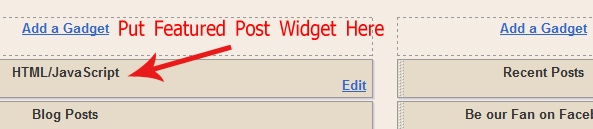
Make sure you have placed the featured post widget on the top of the "Blog Posts" as shown below:
I hope the customization is not so hard. If there is any confusing then you are free to ask question via Comment. Also, you can share you opinion and suggestion.
UPDATE: Try using this hack so the widget will appear only on homepage and it won't overlap the posts: Hiding Featured Post Widget in Post Pages in Blogger
Do you like this featured post widget? Let us see your work!
Labels: Blogger Help, Blogger Widgets


it'll be nice to place this on the top.. good work
ReplyDelete@Johny
ReplyDeleteI am intending to see this widget on your blog :)
but i have stopped blogging... i also want to make a little money but adsense is not allowing me... it blocks my account everytime.. (i discussed this by mail with you.. remember?)
ReplyDeleteStep 3 and Step 6 Code Is Wrong.
ReplyDeleteIn Step 3 Code This Code Should Also Be There
.ui-tabs-nav-item img {
width:45px;
height:45px;
}
Not work for me, please i want know How to Put Related Articles in my blog
ReplyDeletehttp://hapatchan.blogspot.com/
@Johny
ReplyDeleteYes, but you should be patience while Blogging. One day, you'll surely get success :) Keep going on...
@Poras
I'll check it. Thanks for informing.
@Bulma
Let me know what problem is going on if I cans olve it :)
I try hard but didn't work may be some code is mistake like the guy said but i done that ... not work. common ...the pic come down to cover my 3 first block post .. i try to hide three of them .. still one down to my first blog post...common do something...funny
ReplyDeletewww.patanirver.blogspot.com
i am waiting now to get access to a little online cash for to buy a WP premium membership... i think my problem will be minimized with a .com domain.. (i think so)
ReplyDeleteHey Anup the code is wrong!! The Pictures cover the first three post of my blog... please help..
ReplyDeleteMy go and see my blog the featured widget is there but the pictures are out of place, I copied the code exactly.
ReplyDeletehttp://www.techedog.com/
@Poras, Bulma and @Mamunur
ReplyDeleteActually, I used the code same as in Platinum Blogger Template. Now, I have updated the post with the new code. Please have a look!
@Kantang
ReplyDeleteIt works now! :)
Go it working but the big pictures on the featured slideshow still overlap posts... :/
ReplyDelete@Admin
ReplyDeleteNow I've updated the codes. Please check for the update on this post :)
Wow.... now this something really cool! A featured post widget will surely increase the page-views of a blog :D
ReplyDeleteThank you soo much!!!!! now all i need is to add a facebook like button, and a subscribe email widget! haha if you could help. thatd be great! thanks again so much.
ReplyDeletewowwww thanks!!!!!!!!!! oh and if you could help me find out how to post a usershare.net music player for each post... thanks
ReplyDelete@Pubudu
ReplyDeleteYeah! You're right. It helps to increase Page View little bit :)
@Anonymous
Let me get some details please.
@Admin
I'm glad you found it working :)
@ANUP , on the platinum template, theres a "twitter" share button for each post, i would like to add a facebook like button for each post as well. how could i do so?
ReplyDeleteThanks
@Anonymous
ReplyDeleteHi there,
I have posted about Facebook like button here (See on the bottom of the post). Please DON'T be Anonymous while commenting.
Thanks!
Wow, it's work, thanks. :D
ReplyDelete@Rafeyu
ReplyDeleteYes, I can see its working fine on your blog and its looking cool :)
Great trick..thanks for sharing :D
ReplyDeleteSomebody Copied Your Post Without any Backlink.
ReplyDeletehttp://www.wierdwalker.com/2010/09/another-jquery-featured-post-widget-for.html
@Poras
ReplyDeleteThanks for informing me. Even that guy is copying my hole code and post image as well. I have contacted that guy. If he doesn't reply, I will report it to Google.
Whenever I try to edit the code it starts loading then just shows a blank page, as if it's trying to load your page. Not Sure what I'm doing wrong.
ReplyDeletehttp://www.freddyv.net
Any help would be greatly appreciated.
@Freddy
ReplyDeleteI'm not clear about your problem. Please tell me in details, then I can solve your problem kindly!
Where did your edited your code actually?
Anup-
ReplyDeleteAfter narrowing down the problem even more, I figured out that I must be doing something wrong when I replace '#fragment-1' with my URL. That's when everything gets messed up.
Just so I'm clear. I'm replacing both '#fragment-1' that are in blue correct?
Pics and everything else is working, but when I put in my URL it goes crazy.
Thanks again
@Freddy
ReplyDeleteI deleted your previous by mistakenly :( Thats stupid blogger new comments system faults!
Anyway, If you have skipped to step 6 then, please repeat the instructions once again from step 1. The CSS code was wrong before. But now I updated the code. It may work now! It doesn't overlap your posts.
Let me know if there is any problems.
Anup-
ReplyDeleteIt's cool. I think I got it working now. I have another question though. Do you have the code/tutorial on how to post the facebook and twitter share links in this template? I tried doing it using the facebook code but it doesn't show up.
Thanks again. Great template. Makes my blog look much cleaner.
www.freddyv.net is what i used it on.
@Freddy
ReplyDeleteYes, It working on your blog now :) You can found how to add Facebook share button tips on this page (On the bottom of the post).
I hope it helps you. Let me know if it doesn't work.
Anup-
ReplyDeleteGreat thanks. You've been a big help. My blog looks much better now.
@Freddy
ReplyDeleteI am glad everything is working fine on your blog :) Let me know again if there is any problems!
Thanks for using this template.
You can do this easily from my latest tutorial, You don't need to edit any code, just copy and paste it.
ReplyDeleteHere is the working demo of the jquery based automatic content slider.
Here is a tutorial about it, I bet it's a lot easier than this complex code.
It can not auto?
ReplyDelete@sangsang
ReplyDeleteIt is automatic but you have top place content manually!
hi its not working on my blog the page stops loading when i customize it and I must say taht I am not that bad at webdesigning and it means that I put it correctly
ReplyDeleteHi ,
ReplyDeleteI tried it , but the animation is not working
I'm having some trouble with this.
ReplyDeleteI do just as you say and then add it to the platinum template. It seems to be fine when I go on to my blog to check but after a second or two the page redirects to a blank page. What can I do to change this?
Thanks.
@A Thrifty Mrs
ReplyDeleteIf you have skipped from Step 6 then don't do that! Just repeat instruction from Step 1.
You have to remove same CSS code from the platinum template and replace it with the above one.
Hi
ReplyDeleteI did every step on this page from 1-6.It goes wrong each time.
Which code do I need to remove in my css?
Oh and of course, thanks!
ReplyDelete@A Thrifty Mrs
ReplyDeleteSimply, find the same code that you are going to add in your template :)
Which goes like this:
#featured{
...
to
...
.ui-tabs-nav-item img {
Sorry I am unclear as to what I need to do. (I have platinum template!)
ReplyDeleteDo I delete the above code and then do steps 1-6?
Or do I just delete the code and then do step 6?
Please help!
@A Thrifty Mrs
ReplyDeleteTry to follow the following steps:
Go to Blogger.com > Design > Edit HTML. Find and delete entire CSS codes of step 3.
Also find and delete entire code of step 4. Save the template.
Again, follow the tutorial and instruction of the post from step 1.
Let me know if you are again confused!
Hello thanks for being so easy going! I'm afraid I still have problems.
ReplyDeleteI do exactly as you say.
Issues - steps 3 & 4 these codes are in my template twice!
When I finish doing as you say the template editor says something is wrong and that the script isn't closed. There is no way I have deleted any of it.
Is it possible for me to email my template to you?
Ι use this wigdet in my website, but I have a problem since I put google adsense on it. It loads the 4 main divs with delay. Do you know what is wrong with it?
ReplyDeleteYou can check it here: www.athens-football.gr
@A Thrifty Mrs
ReplyDeleteYes of course you can send me your template via contact me form and I will check the problem :)
@Georg
Hi Georg,
I think it is not loading slow. Some JavaScript containing on your site might effect the load time of your blog. And other is similar.
BTW, its looking professional and fits on your site :)
Hi Anup,
ReplyDeletethank you for your response :)
The problem is not exactly that is slowing down the whole page rendering, but when the slideshow is loading, for a second the 4 main divs are all together visible.
You can see the difference here (the page without adsense):
http://www.athens-football.gr/index2test.php
But I think that this is adsense issue.
Hi! I got it sorted in the end with the help of another commenter. The problem was the link needs to go in h2 not fragment.
ReplyDeleteCan I ask another question? (Sorry so many)
Which part of the code should I edit to change to font size of the white writing that goes over the image? I need to make it larger.
@George
ReplyDeleteOh! I got you. You mean, when the page is loading, all three part of slideshow is visible together. I think it is similar to all jQuery slideshow. But when the page loading is complete it returns back to normal :)
And that is not a Adsense issue :)
@A Thrifty Mrs
You have to make some minor CSS change to modify h2 and text size of slideshow.
Yo do so, change font size 18px to 22px or keep increasing as you need.
#featured .info h2{
font-size:18px; font-family:Georgia, serif;
color:#fff; padding:5px; margin:0;
overflow:hidden;
}
#featured .info p{
margin:0 5px;
font-family:Verdana; font-size:11px;
line-height:15px; color:#f0f0f0;
}
Hope it helps.
Is it a requirement to have the Platinum Theme? otherwise the scroller wont work? I am trying to get this to work on www.bbleaks.com but it keeps showing all the images and then forces me to a blank page with all of my ads...it doesn't make sense. Please help :)
ReplyDelete@LouiV
ReplyDeleteHave you done all the steps. You should start from step 1 :)
hai anup bro.. i use your platinum template, but..the problem i got is the same with these Mamunur said...
ReplyDeleteHey Anup the code is wrong!! The Pictures cover the first three post of my blog... please help..
September 13, 2010 1:03 PM
Mamunur said...
My go and see my blog the featured widget is there but the pictures are out of place, I copied the code exactly.
http://www.techedog.com/
are you sure it was updated? please help, i badly wanna add that slide.. :(
It works thanks.
ReplyDeleteTake a look : http://androidbuster.com
hi! I Like this feature very much. But I want this feature to be seen on home page only not on static and posts. How can I do that? please help.thank you.
ReplyDeleteHere's my test blog link:http://breakinglimits.blogspot.com
hi! I like this feature very much but I want this to be seen ONLY on HOME PAGE not on static and posts. how can I do that? thank you. hope you can help. Thanks a lot!
ReplyDelete@Noel
ReplyDeleteHi Noel,
Just follow the following steps to display featured post widget only on homepage:
Find <body> tag on your template and add the following code just below it:
<b:if cond='data:blog.pageType == "item"'>
<style type="text/css">
#featured{display:none;}
</style>
</b:if>
Save the template! You're done. I hope it helped you :)
looks fairly easy to do, will give it a try shortly.
ReplyDeleteI m having problem in changing page number.At bottom it displays page number like 1,2,3,etc.My problem is when i click on page number 2 it automatically shows page number 3 with black mark and some bug is showing.please help me.
ReplyDelete@devlevis
ReplyDeleteCan I have your blog URL please?
my blog url is
ReplyDeletehttp://techgadz.blogspot.com/
Thanks for the great template.
ReplyDeleteBut there is a small problem with changing the default logo.
when I tried to replace default logo 'Platinum Theme', my logo turned to be very small. I tried to increase the size by editing html, what I got is a blurred logo.
Is there any way to fix this. It would be great help then.
- Phoenix
This is beautiful. I love it.
ReplyDeleteI'm having the same problem as George above. Every image shows up.
I'm waiting and waiting for it to load completely, but each link on the side keeps saying 'loading', one at a time. It won't finish.
The rest of the blog is loaded.
I do have a slow connection but the demo site loads fine for me.
@Monica
ReplyDeleteI think you are testing featured post widget on this blog: http://testingmon2.blogspot.com
Right?
If yes, then it is working very fine :)
When page is loading, the 3 images shown up together but after complete page load, it goes back to normal as in Demo blog.
@Phoenix Ryder
ReplyDeleteSend me your copy of template plus image URL. I'll try to solve it.
You can use contact me form.
@devlevis
ReplyDeleteWhy I can't see the featured post widget in your blog?
bro i only dint add features post widget.
ReplyDeleteplease clarify my below doubts.In feature post widget we can add only 4 images and if we try to add more images then it will not work.so is thr any solution for this?
nd also in this post you havent added "Add a gadjet"to header,so we cant put ads thr.So can you please tell me how to add gadjet in header?please
hey anup i did what was given in the tutorial but the images overlap my posts what to do plz help me out. watch this out http://techsavysblog.blogspot.com
ReplyDeleteI have the same problem as the person above me.
ReplyDeleteI'm using a template from the blogger. template designer
@devlevis
ReplyDeleteI'll look if it is possible to place more than 3 content in this widget. To place this widget on the header, grab the widget box to the top of your blog's layout(to the header area).
@PhOEniX-_-PhX and FrancoB
Make sure you haven't missed any of the above steps.
Really it is a very gud template i ever seen.Big thnx for Anup.
ReplyDeleteI have successfully implemented this and it is correctly working.
check this site
http://www.techgadz.com/
Thank you Anup for sharing your knowledge and talent.
ReplyDeletePlssssss HELP ME! Could not figure out why this is happening... I did everything exactly the way you said... Steps 1 to 6...
ReplyDeletehttp://cultzine-cinema.blogspot.com/
pls help
xx
Zaira
@devlevis
ReplyDeleteI'm glad its working for you :)
@Craig Brown
You're welcome :)
@Zaira Brilhante
I saw 3 big images are overlapping the posts. Have you try to re doing the steps?
@anup is there any way to add posts using labels here? It would really save lot of time & work... Thanks.
ReplyDelete@Kaamil
ReplyDeleteSorry. What does that mean? Do you want categories to be listed on featured post widget?
Please HELP ME.. I try hard but didn't work may be some code is mistake like the guy said but i done that ... not work.
ReplyDeletecek this http://www.naturalhealthnbeauty.info/
It was great thanks for sharing
ReplyDeleteI am planing to add this feature in my blog
Anup, I had loved the way in which you explained the stuff. I had once tried this slider in blog, but unfortunately it did not suit my blog. So went in for another. But I I have linked to this post of yours from my blog post which lists 10 Featured Posts sliders for Blogger blogs
ReplyDeleteHi! Thanks so much for this widget, but I can't seem to figure out what I'm doing wrong. It keeps over lapping my post, and I've tried everything but I can't seem to get it to work.
ReplyDeleteIf you can check it out and let me know, that'd be awesome.
http://letstestthings.blogspot.com/ <3
Thanks!
- AVA
:)
great its working ,,thanks dude for this nice template ,, i like it ,, thanks so much (^_^)/
ReplyDeleteits working guys ,, check this link http://joysmiles.blogspot.com
ReplyDeleteHi Anup,
ReplyDeleteI sent a message via your "Contact Us" page. I am having a problem running the widget on my blog. It keeps overlapping on the other banners.
Thanks!
Really nice template, I really like it.
ReplyDeleteBut I have some problem to install it on my site. The #featured use jquery seem conflict with my prototype.js, make #featured not works, but I already fix this.
The #featured also overlap when loading, it look not good for me. So I fix it a little.
Overall, this is the best template I've ever use. Good job Anup, can't wait another good template from You.
i did all the steps but it always redirects to a blank page... loading forever... please help..
ReplyDeletesite url is www.asianjunkiez.com
how to adjust the width of the frame so the admin!
ReplyDeletespecial thx to you....
ReplyDeleteThank u, it's working
ReplyDeletehttp://www.hadissoft.com/
It works fine.My question is can this slider (script) can be modify so it takes automatic latest content from blog and show .There a lots of slider that can do it included with template but i want this slider and didnt see anywhere template with this slider that automatic take content..so can it be done,and how ? best regards
ReplyDeleteYeah this isn't quite right unfortunately. I've got it working though and explained here: Feature sites for Blogger Gadget Hack. Thanks so much for your help though Anup.. you the man. I'm a fan for life. I'm spreading the word of your good work!
ReplyDelete- tork
really very nice effect buddy nice work
ReplyDeletei want to ask i have one another jquery slider in my blog when ever i put this code one thing is working and one is not ..this code works properly but for this code stop anothor jquery slider ..what should i do i want to use both .plz help me i will very thankfull to you..http://macrogirls.blogspot.com/
ReplyDeleteFirst of all view the Demo here. (??????????????)
ReplyDeleteCan Someone answer the questions (Maybe other than Admin )So that we can solve our queries??
ReplyDeleteAbout Overlapping Posts issue:
ReplyDeleteTry using this hack so the widget will appear only on homepage and it won't overlap the posts: Hiding Featured Post Widget in Post Pages in Blogger.
Hope this helps.
@.kimchi
I can't see the widget in your blog..?
@Linh Dung VnMart
At the initial CSS line just change the width as your wish:
#featured {
width:336px ...
@Oasis
Unfortuantely, the coding are arragned with respect to manual update so it grabbing autmatically new content is currently off.