
You might have seen Adsense revenue sharing in many popular WordPress blogs. But you also loved to add revenue sharing widget on your blogger blog. Blogger support for multiple author as in WordPress. To share a love and receive many posts from other author, you can embed Revenue Sharing Widget on your Blogger BlogSpot blog!

Using this widget can help you if you have multiple authors or writers. Let the other author gets benefits while writing on your blog.
Why It is Important?
There may be separate Google Adsense account with each authors and writers of your blogger blog. In each post that they write, there appears Google ads of their own. So, your author can easily get benefits whenever they write on your blog. They will get more inspiration that they can earn more from your blog!
Lets see the tutorial how to add this widget on your blog.
Sign in to Blogger.com and Go to Design > Edit HTML.
Check the 'Expand widget Template' box.
Find the following code in your template:
Now, paste the following code just above <data:post.body/>
It may not work when you directly Copy/Paste the code from Adsense. Encode the adsense code from here. Make sure that you have place the right code as shown below:
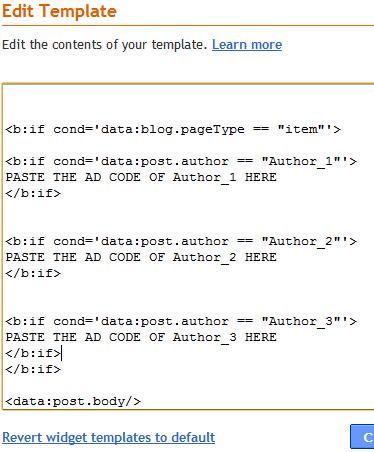
Replace Replace the red color text with your author adsense code. And Replace blue color text with the NAME of the author (You've chosen the name when you register). The author names must not be different, it should be unique. Place the author name when they have chosen when they registered the blogger account.
It can be found on the profile editing page.

Finally, save your template. Now your writer can get fully monetized post!
Not only with Google Adsense even you can use this trick with other ad service if your author use it. It is your choice to choose the banner size. I recommend to place square banner. It is best visible on the blog posts.
Now your blog is Adsense Revenue Sharing Blog with multiple authors where each and every authors can get benefits whenever they write on your blog. Enjoy blogging with blogger!
Let me know if you have used this trick on your blog.
Using this widget can help you if you have multiple authors or writers. Let the other author gets benefits while writing on your blog.
Why It is Important?
There may be separate Google Adsense account with each authors and writers of your blogger blog. In each post that they write, there appears Google ads of their own. So, your author can easily get benefits whenever they write on your blog. They will get more inspiration that they can earn more from your blog!
Lets see the tutorial how to add this widget on your blog.
Sign in to Blogger.com and Go to Design > Edit HTML.
Check the 'Expand widget Template' box.
Find the following code in your template:
<data:post.body/>
Now, paste the following code just above <data:post.body/>
<b:if cond='data:blog.pageType == "item"'>
<b:if cond='data:post.author == "Author_1"'>
PASTE THE AD CODE OF Author_1 HERE
</b:if>
<b:if cond='data:post.author == "Author_2"'>
PASTE THE AD CODE OF Author_2 HERE
</b:if>
<b:if cond='data:post.author == "Author_3"'>
PASTE THE AD CODE OF Author_3 HERE
</b:if>
</b:if>
It may not work when you directly Copy/Paste the code from Adsense. Encode the adsense code from here. Make sure that you have place the right code as shown below:
Replace Replace the red color text with your author adsense code. And Replace blue color text with the NAME of the author (You've chosen the name when you register). The author names must not be different, it should be unique. Place the author name when they have chosen when they registered the blogger account.
It can be found on the profile editing page.
Finally, save your template. Now your writer can get fully monetized post!
Not only with Google Adsense even you can use this trick with other ad service if your author use it. It is your choice to choose the banner size. I recommend to place square banner. It is best visible on the blog posts.
Now your blog is Adsense Revenue Sharing Blog with multiple authors where each and every authors can get benefits whenever they write on your blog. Enjoy blogging with blogger!
Let me know if you have used this trick on your blog.
