
Almost all of the recent posts widget is based on the JavaScript codes. It may effects on the loading time of the blog. But now, you don't have to worry about that! I'll show you how to add fast loading recent post widget on your blog.

You may have the recent post widget provided by blogger that you can add it using your feed URL. But, that was pretty slow. In fact, FeedBurner recent post widget is 100% working. You can see the done on this blog as well (On the right sidebar).
Actually, this widget is derived from FeedBurner which is very systematical and easy to install. Lets do that! Just follow the following steps to add feedburner recent post widget on your blog:
Adding Feedburner Recent Post Widget
1. Log on to your Feedburner account (Sign up here it you don't have already).
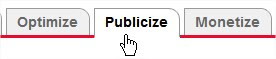
2. Click on the Publicize button on the top navigation bar,
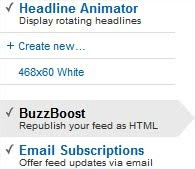
3. On the left sidebar, click on the BuzzBoost.
4. Now, scroll down until you see the options to customize.
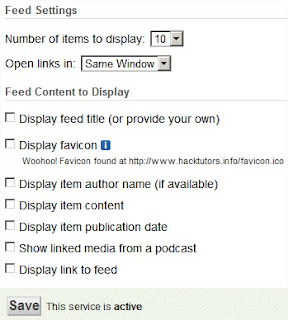
Check the options as your need. You can leave the options unchecked to make it looks perfect! But, you have to choose Number of links to display on the widget. Here I have choose 10 post to display.
5. Now click Save button (Below the options).
6. You can preview the widget as show below. And copy the code they provided.
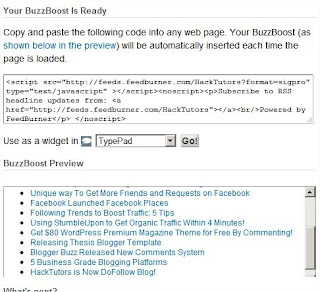
7. Log on to your Blogger account. Go to Design > Page Element > Add a Gadget > HTML/JavaScript. And paste the code that you have copied on step 5.
8. Save the widget and you're done!
I hope you like this widget. Now, you don't have to use other JavaScript codes or Feed URL to add recent post widget. Also, you can customize this widget as you have done in step 4. After customizing, you don't need to worry about the code that you have added on your blog (FeedBurner automatically arrange it).
Share your opinion how do you like this widget?
You may have the recent post widget provided by blogger that you can add it using your feed URL. But, that was pretty slow. In fact, FeedBurner recent post widget is 100% working. You can see the done on this blog as well (On the right sidebar).
Actually, this widget is derived from FeedBurner which is very systematical and easy to install. Lets do that! Just follow the following steps to add feedburner recent post widget on your blog:
Adding Feedburner Recent Post Widget
1. Log on to your Feedburner account (Sign up here it you don't have already).
2. Click on the Publicize button on the top navigation bar,
3. On the left sidebar, click on the BuzzBoost.
4. Now, scroll down until you see the options to customize.
Check the options as your need. You can leave the options unchecked to make it looks perfect! But, you have to choose Number of links to display on the widget. Here I have choose 10 post to display.
5. Now click Save button (Below the options).
6. You can preview the widget as show below. And copy the code they provided.
7. Log on to your Blogger account. Go to Design > Page Element > Add a Gadget > HTML/JavaScript. And paste the code that you have copied on step 5.
 |
| Click to Enlarge |
8. Save the widget and you're done!
I hope you like this widget. Now, you don't have to use other JavaScript codes or Feed URL to add recent post widget. Also, you can customize this widget as you have done in step 4. After customizing, you don't need to worry about the code that you have added on your blog (FeedBurner automatically arrange it).
Share your opinion how do you like this widget?
